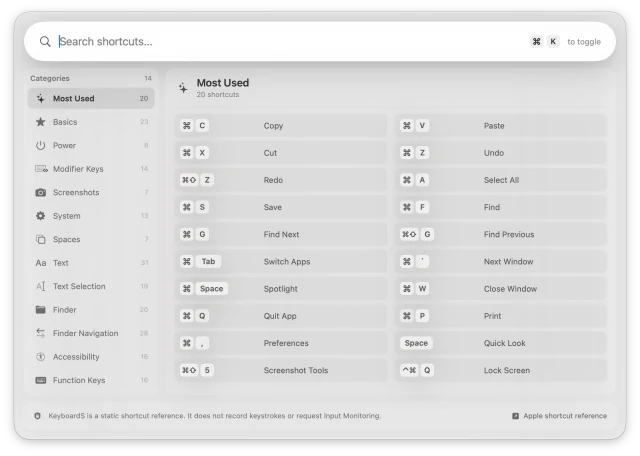
Most UsedYour twenty everyday shortcuts, first.SearchPick a category, or just start typing.
Features.
⌘ + K, Anywhere. — one keystroke brings up every macOS shortcut, in any app. Press it again and it's gone.
Instant Search — type a word like "screenshot" and results filter as you go.
200+ Shortcuts — labelled in plain language, not Apple's documentation phrasing.
Menu Bar App — sits quietly in the menu bar, with no Dock icon and no clutter.
Private by Design — never reads what you type and never asks for Input Monitoring.
14 Categories, One Panel.
Most Used
Basics
Power
Modifier Keys
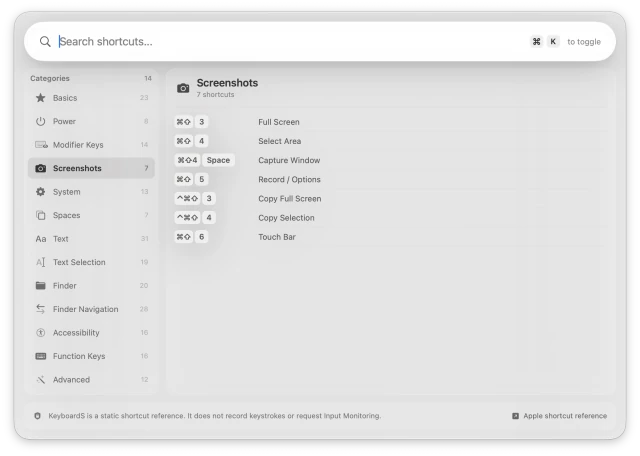
Screenshots
System
Spaces
Text
Text Selection
Finder
Finder Navigation
Accessibility
Function Keys
Advanced
Ready in 3 Steps.
Open It. KeyboardS settles into the menu bar, out of your way.
Press ⌘ + K. The panel appears over whatever app you're in.
Find It. Type a word or pick a category, then press ⌘ + K again to carry on.
What People Are Saying.
“I kept looking up the same five shortcuts in Safari. Now I hit Command-K, type two letters, and get on with it. It is one of those tiny Mac utilities that earns its place straight away.”
— Claire T., Freelance Designer
“This is exactly the kind of app I want in the menu bar: fast, quiet, and genuinely useful. I use it multiple times a day without thinking about it.”
— Hannah R., Product Manager
“It feels like a cheat sheet for the Mac. I stopped memorizing screenshots and system shortcuts and just search on demand. That alone saves me time.”