Who Owes What
Statement of Account
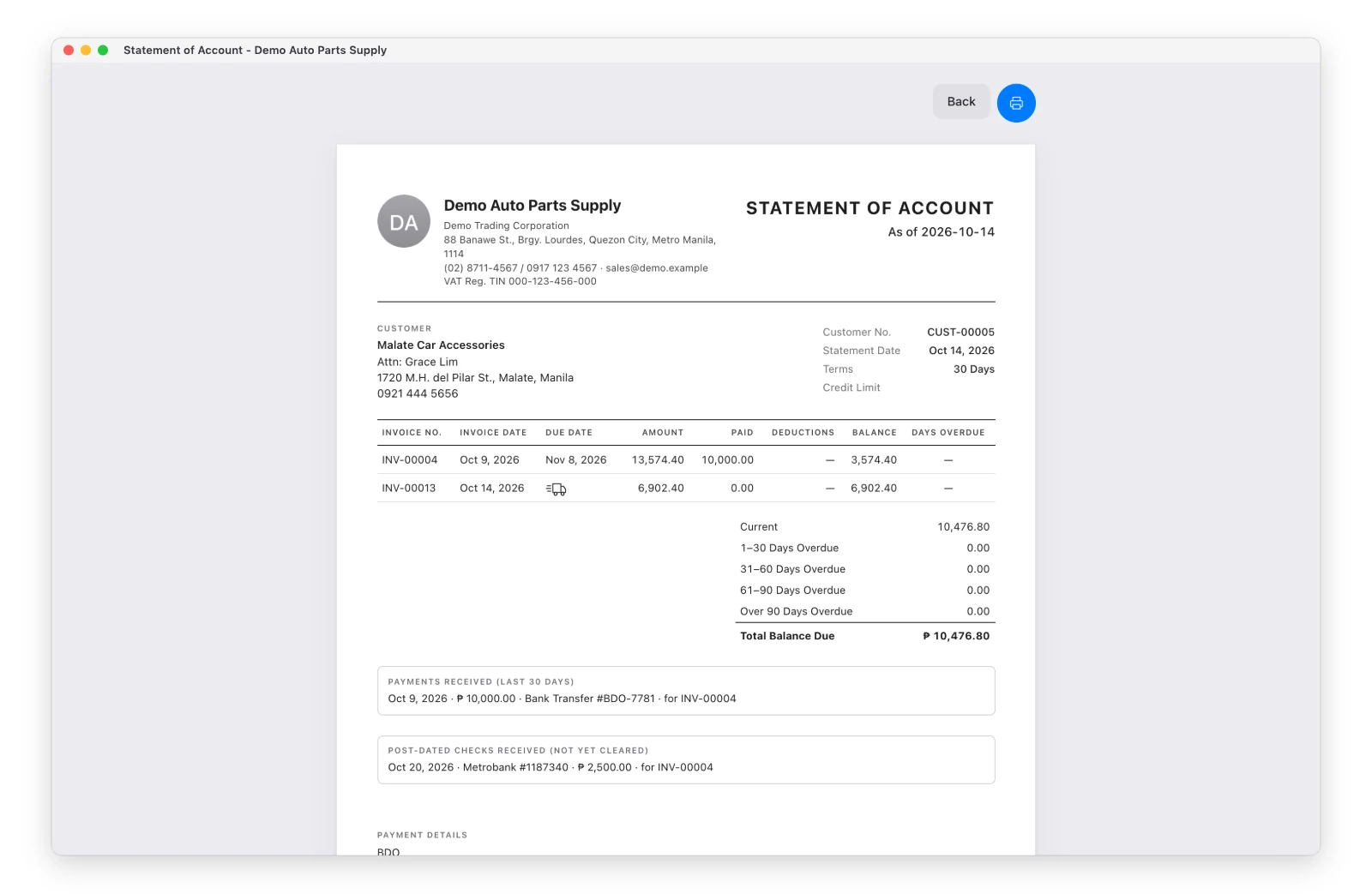
For one customer: open the customer → Statement of Account. It lists every open invoice with what’s been paid, the balance and days overdue, plus aging (Current, 1–30, 31–60, 61–90, over 90 days), pending checks and recent payments. Print it or save it as PDF to send.
For everyone: Reports → Sales → Statement of Account → All Customers — one line per customer.
Customer Ledger
Open the customer → Ledger: every invoice, payment, deduction and credit memo in a date range, with the running balance. Print it or export it to a spreadsheet (CSV).
Reports
| Report | Shows |
|---|---|
| Accounts Receivable | All unpaid invoices, those due this month, or aging by customer |
| Collection Forecast | What should come in, by due date — overdue, next 30 / 60 / 90 days |
| Cash & Collections (admin) | Collected today, this week, this month; money on hand; a 4-week cash forecast |
| Customer Deductions | Every deduction by type and customer |
Cash & Collections needs your starting balances (cash, bank, e-wallets) entered once on that page before its Money on Hand is right.