Backups and Updates
Automatic Backups
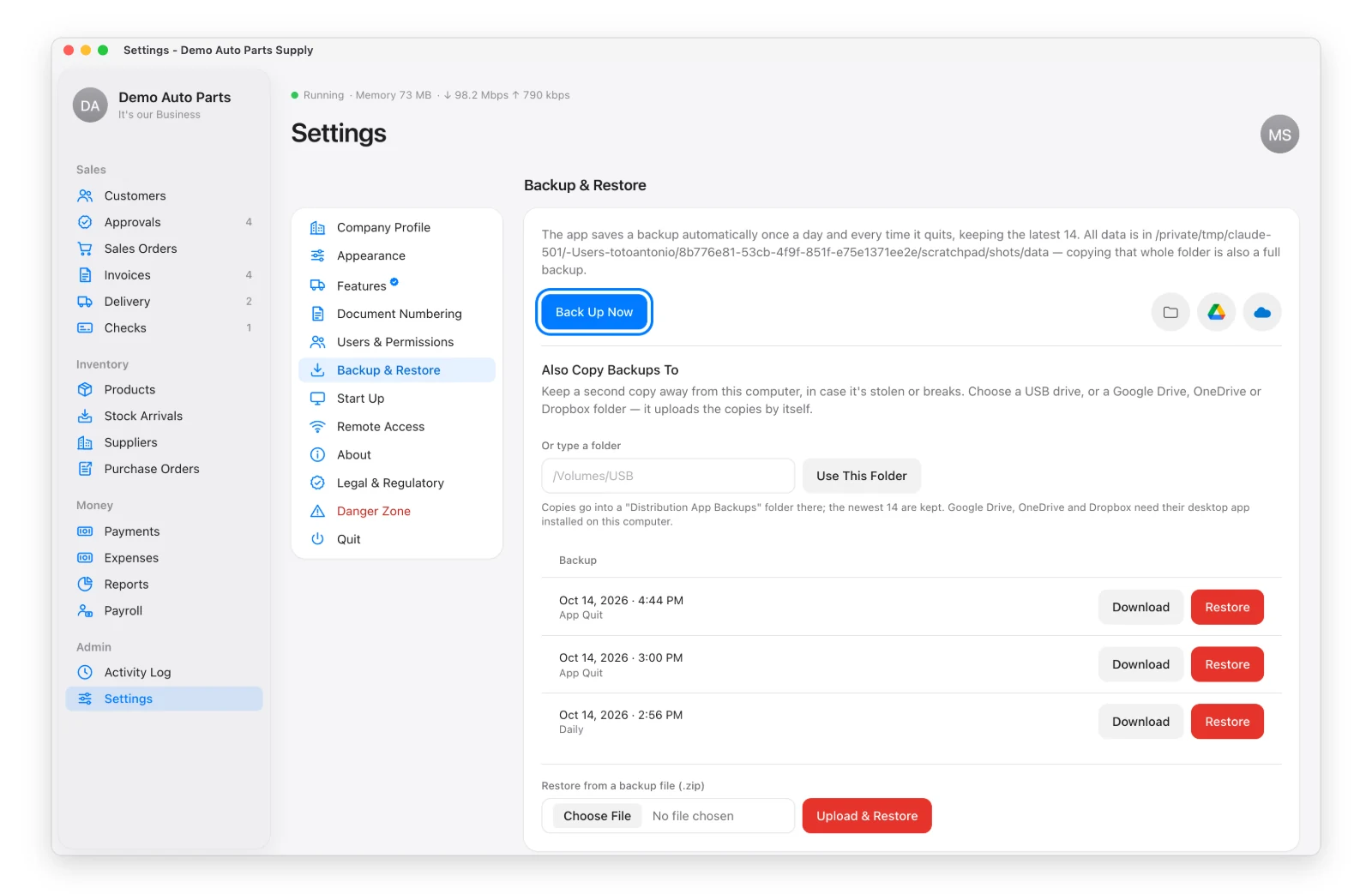
The app saves a backup every day and every time it quits, and keeps the last 14. You can also click Back Up Now in Settings → Backup & Restore.
Keep a Copy Somewhere Else
A backup on the same computer won’t help if that computer is lost. Under Also Copy Backups To, pick a USB drive or your Google Drive, OneDrive or Dropbox folder. Every backup is then copied there too.
If the copy fails (e.g. the USB drive is unplugged), Settings shows an orange note. Your backups on the computer are still made.
Restore a Backup
Pick a backup → Restore. The app checks the file first, restarts, and comes back with that day’s data. Your current data is kept aside until the restore is complete.
Updates
The app checks for a new version once a day. Admins see Update Available at the top.
Settings → About → Install Update. The app downloads the new version, checks it’s genuine, saves a backup, replaces itself and restarts. Your data isn’t touched.
With a one-time purchase, updates are included until the date on your license. After that the app keeps working on your version; Renew to get newer ones.
Your License
Click your picture → License to see your plan, add-ons, user limit and updates date, or to paste a license key or activation code.